Give every member a role and every change a record
Invite your team by e-mail, set roles on the organization and keep who changed what on the record
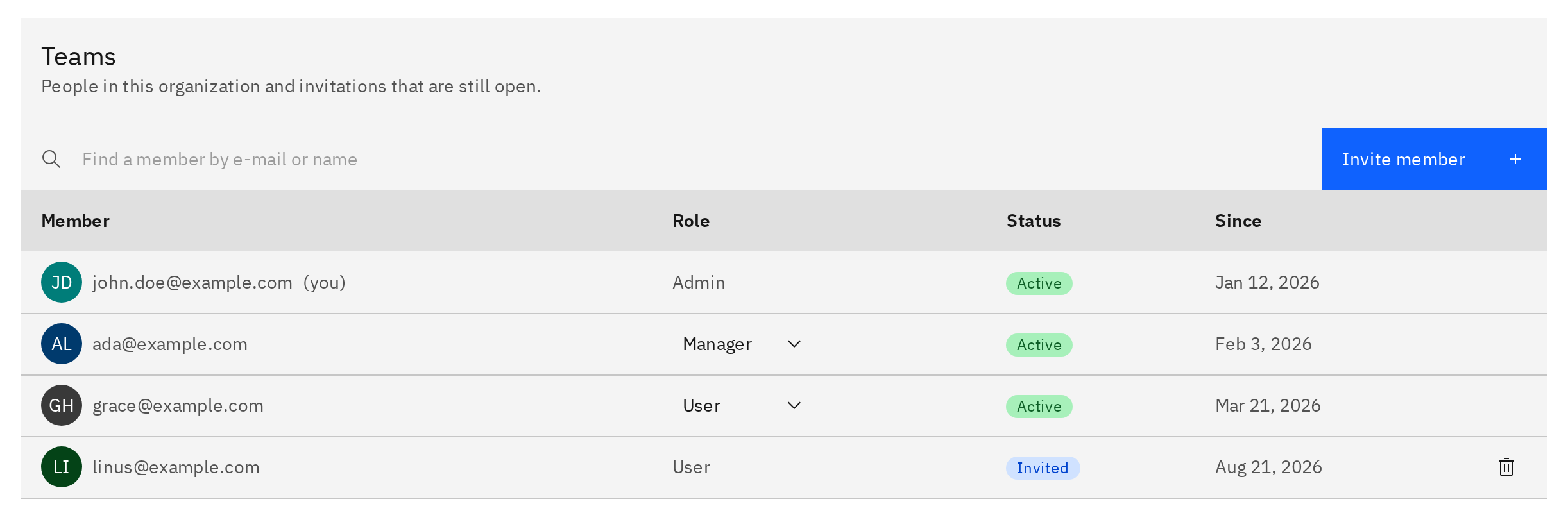
One organization, three roles, one history on every record
An organization in Magnus Reactor is an operating company. Its members sign in once, work across its installations, plants and systems, and carry a role that says what they may do: admin, manager or user. Invitations go out by e-mail, the role travels with the invitation, and the members table shows who is in, who is still pending and who holds which role.
Approvals are not a side channel. A work order moves from requested to approved as a lifecycle state on the record, a failure event is closed by someone other than the person who reported it, and every transition is written to the status history with who changed it, when, and a note. The audit trail is the record itself, not a report about it.
See approvals on the work orderBenefits
Control who can change the register
Admins manage settings, members and roles. Managers invite people and maintain tags, installed units and hierarchy. Users work with the register. Roles live on the organization, so one person can hold a different role in each organization they belong to.
Invite members without provisioning accounts
Enter an e-mail address and pick a role. The sign-in service sends a registration link to a new address or an accept link to an existing user, and the role is applied the first time the invitee signs in.
Approve work as a state, not a message
A work order is requested, then approved, then planned, scheduled and executed. The approval is a transition on the record, visible to everyone who opens it, and a safety-critical job that has run overdue waits for the technical authority before it moves.
Prove who changed what and when
Every status change on a work order or failure event lands in the status history as a row with a name, a time and a note. Open the record and read the trail.
Three roles
Run the organization as admin
Manages the organization: settings, members and roles. An admin renames the organization, invites members, changes any member's role and revokes pending invitations. The person who creates an organization is its first admin.
Keep the register current as manager
Invites members and maintains the register. A manager brings colleagues in by e-mail with the role they should hold, and owns the asset register day to day: functional locations, installed units, change-outs and the hierarchy above them.
Work with the register as user
Works with the register. A user searches tags, opens equipment records, follows the hierarchy down to the installed unit, raises and progresses work orders and reports failure events. Every record they raise and every state they move carries their name.
From invitation to audit trail
Bringing a colleague into the organization takes one e-mail address and one role; the rest is recorded on the way.
Invite by e-mail
An admin or manager enters an address and chooses admin, manager or user. No name, no password and no account to create in advance.
The sign-in service sends the link
A new address receives a registration link; an existing user receives an accept link. The invitee signs in through the same sign-in page as everyone else.
The role waits on the invitation
The chosen role is parked on the pending invitation. Re-invite the same address to change the role and resend; revoke it while it is still pending.
Pending until first sign-in
First sign-in applies the role
When the invitee signs in for the first time, membership and role are written together. Nothing is granted before that moment.
The member appears in the table
The members table lists every member with their role beside the open invitations. Admins change roles here.
Last admin stays admin
Work moves through approval states
A work order is requested, then approved, then planned and scheduled. Approval is a state transition on the record, with the approver's name on it.
A second person closes the failure
Someone other than the member who reported a failure event closes it, so the coding is verified before the record is final.
Closed by another member
Status history keeps the trail
Each transition becomes a row in the status history. Comments and notifications sit on the same record, not in a separate inbox.
Part of one record
Membership, approval and verification are fields on the same work orders, failure events and tags that every other product page describes.
Work Orders
Approve as a state on the work order
The requested-to-approved transition is a row in the status history of a work order in Work Orders, carrying the approving member and the time. Cancel, schedule and complete are written the same way.
Asset Management
Let managers maintain the register
The manager role is what allows a member to add functional locations in Asset Management, record a change-out of an installed unit and keep the installation, plant and system hierarchy current.
Permit to Work
Sign the safety-critical job as technical authority
A safety-critical work order that has run overdue carries a technical-authority approval field, the same authority that approves permits in Permit to Work. The signer is a named member of the organization.
Questions we are asked
No. You invite an e-mail address and choose a role. If the address is unknown, the invitee receives a registration link and creates their account on the way in; if they already have one, they receive an accept link. The role you chose is applied at their first sign-in, and the invitation stays visible as pending until then.
Any member of the organization can. Approval is a transition from requested to approved, recorded with the approver's name in the status history. A safety-critical work order that has run past its latest allowable finish also waits for technical-authority approval, which is a separate field on the record, so that sign-off is explicit rather than implied.
No. A failure event is closed by a member other than its reporter, which is the verification separation ISO 14224 asks for: someone else confirms the failure mode, mechanism and cause coding before the record is final. The record stays open until its corrective work order completes, then waits for that second pair of eyes.
While the invitation is pending, invite the same address again with the right role; that updates the role and resends the link. You can also revoke a pending invitation outright. Once the member has signed in, an admin changes their role directly in the members table. The only rule is that the last admin cannot be demoted.
On the record. Every status change on a work order or failure event is stored in its status history with the previous state, the new state, the member who made the change, the timestamp and an optional note. Comments and notifications attach to the same record, so the history of a job is read in one place.
Yes. A member can belong to several organizations and switch between them from the header. Roles are set per organization, so the same person can be an admin in one operating company and a user in another, and every record they touch is scoped to the organization they were working in.